How Customer Self-Service Order Management Is Transforming Modern Decorated Apparel and Promotional Product Shops

Decorated apparel and promotional product businesses are increasingly adopting customer self-service order management systems to meet rising client expectations for transparency and speed. Modern decorated apparel and promotional product management software provides real-time order tracking, centralized proof approvals, and automated communication through customer portals. These tools reduce email back-and-forth, improve production efficiency, and help these shops scale operations while delivering a better client experience.

Introduction

The decorated apparel and promotional products industry is experiencing a major operational shift. As customer expectations evolve, many shops are moving away from manual order updates and email-based communication toward self-service customer portals and centralized workflow platforms.

In the past, order updates often required repeated emails, phone calls, or internal coordination between sales and production teams. Today, businesses that implement modern decorated apparel and promotional product order management software are providing customers with direct visibility into order status, artwork approvals, and production progress.

This shift is not just about convenience. It represents a broader move toward operational transparency, automation, and scalable workflow management in the industry.

Why Email-Based Order Updates Slow Shops Down

Many decorated apparel and promotional product companies still rely heavily on email for order updates, proof approvals, and customer communication. While email is familiar and accessible, it creates several operational challenges as order volume increases.

Common Problems with Email-Based Order Management

  1. Fragmented Communication: Important details become buried in long email threads between customers, sales representatives, and production teams.
  2. Delayed Proof Approvals: Customers may miss emails or respond slowly, delaying production timelines.
  3. Repeated Status Inquiries: Customers frequently ask for updates, increasing the administrative workload on staff.
  4. Limited Visibility Across Departments: Production, design, and sales teams may be referencing different information sources.

These challenges slow production workflows and create unnecessary friction across the business.

Modern promotional products workflow management systems address these issues by centralizing order information and making updates accessible to both staff and customers.

What Customers Expect From Modern Order Tracking

Customer expectations for order transparency have changed significantly. Many buyers now expect the same level of visibility they receive from eCommerce platforms.

Modern clients want to know:

  • When their artwork proof is ready
  • Whether their order is approved for production
  • The current stage of production
  • When their order will ship

Without real-time visibility, customers naturally contact sales representatives or customer service teams for updates.

A customer portal business solution provides an alternative approach by giving customers direct access to their order information through a secure online dashboard.

Key Capabilities of Customer Portals

Modern customer portals typically allow clients to:

  • Track order status in real time
  • Review and approve artwork proofs
  • View order history
  • Receive automated updates
  • Communicate with the shop through a centralized system

This approach significantly reduces communication bottlenecks while improving the overall customer experience.

How Self-Service Portals Improve Production Efficiency

Customer self-service portals are becoming a critical component of promotional products workflow management. By removing manual communication steps, these systems allow production teams to move jobs forward more efficiently.

Faster Proof Approval Cycles

Artwork proofs delivered through a centralized platform allow customers to review and approve designs quickly. This reduces delays caused by missed emails or unclear feedback.

Fewer Communication Bottlenecks

When order details, approvals, and updates are visible in one place, teams spend less time relaying information between departments.

Reduced Administrative Work

Customer service teams spend less time responding to status inquiries because customers can access updates themselves.

Improved Production Planning

Real-time visibility into approvals and job status helps production managers schedule jobs more accurately and reduce delays.

What Does Decorated Apparel & Promotional Product Order Management Software Do?

Decorated apparel and promotional product order management software centralizes the systems used to manage customer orders, artwork proofs, production workflows, and communication.

Instead of relying on separate tools, these platforms integrate multiple functions into a single operational hub.

Core Capabilities Typically Include

  • Order tracking and job status visibility
  • Artwork proof management and approvals
  • Production workflow management
  • Communication tracking
  • Customer portal access

By consolidating these functions, decorated apparel and promotional products businesses gain greater operational control and reduce reliance on manual processes.

The ShopWorks platform brings these capabilities together by integrating order tracking, proof approvals, and production workflows into a unified system used by both internal teams and customers.

How Can Customer Self-Service Portals Improve Operations?

Customer self-service portals provide several operational and customer experience benefits for decorated apparel and promotional product businesses.

What are the benefits of self-service order management?

Self-service order management allows customers to access order updates, approve proofs, and monitor job status without relying on manual updates from staff. This improves transparency while reducing administrative work.

How do customer portals help customers approve proofs faster?

Customers receive notifications when proofs are ready and can review them directly in the portal. Approval or revision requests can be submitted instantly, allowing production to proceed more quickly.

How do self-service portals reduce communication bottlenecks?

Instead of routing every customer question through sales or customer service teams, customers can view updates and order details themselves.

Can customers see real-time job status?

Yes. Most modern decorated apparel and promotional product order management software systems allow customers to track order progress in real time through their portal dashboard.

How do portals reduce administrative workload?

Staff spend less time responding to emails and phone calls requesting updates. Automated notifications and portal access handle many of these inquiries.

Do customer portals improve customer retention?

Yes. Transparent communication and faster order approvals improve the customer experience, which often leads to stronger relationships and repeat business.

The Future of Workflow Management in the Industry

As decorated apparel and promotional product businesses grow, operational complexity increases. Managing orders through email and spreadsheets becomes increasingly difficult.

Businesses that adopt modern decorated apparel and promotional product order management software gain several long-term advantages:

  • Improved operational efficiency
  • Better communication between departments
  • Increased customer transparency
  • Faster proof approval cycles
  • More scalable production workflows

Customer self-service portals represent a natural evolution for the industry, helping shops deliver the transparency and responsiveness modern clients expect.

Conclusion

Decorated apparel and promotional product companies are entering a new era of workflow modernization. Customers increasingly expect visibility, faster communication, and simplified approvals.

By implementing systems that support customer portal functionality, real-time order tracking, and centralized promotional products workflow management, shops can significantly reduce manual work while improving customer relationships.

Modern solutions such as ShopWorks help bring these capabilities together, enabling shops to manage orders, proofs, and production workflows within a single transparent system.

For growing decorated apparel and promotional products businesses, self-service order management is quickly becoming an essential part of staying competitive.

Key Takeaways

  • Modern shops are replacing email-based order updates with customer portals.
  • Self-service portals improve proof approval speed and reduce communication delays.
  • Centralized order management software increases transparency across departments.
  • Better workflow visibility improves production efficiency and customer satisfaction.
Why 2026 Is the Year to Automate Customer Communications…and How ShopWorks Makes It Easier

In 2026, speed and clarity aren’t “nice to have”, they’re expected. Customers ordering custom print, promo products, embroidery, and decorated apparel want instant updates, fast proof approvals, and frictionless payment reminders.

That’s why automated customer communication is no longer optional. It’s essential.

For growing shops, the right print shop communication tools can dramatically reduce manual outreach, shorten approval cycles, and improve customer satisfaction. With ShopWorks automation, you can streamline order confirmations, proof approvals, status updates, and invoice reminders…all while freeing your staff from repetitive tasks.

Why Communication Automation Matters in 2026

Customer expectations have changed. Today’s buyers:

  • Expect immediate order confirmations
  • Want real-time status updates
  • Prefer digital proof approvals
  • Anticipate automated invoice reminders with payment links

When shops rely on manual emails, phone calls, and spreadsheets, communication delays become inevitable. That leads to:

  • Slower production timelines
  • Missed approvals
  • Frustrated customers
  • Staff burnout

Automated customer communication solves this by ensuring customers receive accurate updates at every stage without someone on your team having to manually send each message.

In 2026, shops that automate communication will:

  • Close approvals faster
  • Reduce errors
  • Improve cash flow
  • Deliver a more professional customer experience

Common Communication Bottlenecks in Shops

Even successful print and apparel shops face recurring communication challenges.

Manual Order Confirmations

Staff manually send confirmation emails, which can be delayed during busy production periods.

Proof Approval Delays

Artwork proofs are emailed as attachments, requiring back-and-forth replies that slow down production.

Status Update Overload

Customers frequently call or email asking, “Is my order in production?”, or, “Has my order shipped yet?

Forgotten Invoice Reminders

Late payments often stem from inconsistent follow-up or missed reminder emails.

These bottlenecks cost time, money, and team morale.

The solution? Purpose-built print shop communication tools designed specifically for decorated apparel, promo, and print workflows.

How ShopWorks Tools Streamline Customer Interactions

ShopWorks automation helps shops eliminate repetitive communication tasks while keeping customers informed at every stage.

ProofStuff: Faster Artwork Approvals

With ProofStuff, shops can:

  • Send digital artwork proofs instantly
  • Allow customers to approve online
  • Track approval timestamps
  • Eliminate confusing email threads

This dramatically shortens approval cycles and prevents production delays.

ManageOrders: Automated Status Updates

With ManageOrders, you can:

  • Automatically send order confirmations
  • Trigger production status updates
  • Notify customers when items ship
  • Keep communication tied directly to job progress

Instead of manually answering “Where’s my order?” emails, your system does it for you.

Automated Notifications: Smarter Payment Reminders

Late payments hurt cash flow. ShopWorks helps by:

  • Sending invoice reminders automatically
  • Including secure payment links
  • Reducing awkward follow-up calls
  • Improving on-time payment rates

The result? More predictable revenue and less administrative stress.

Top Customer Communications to Automate

  • Order confirmations & acknowledgments
    Immediate confirmation builds trust and sets expectations from day one.
  • Artwork proof distribution & approvals
    Digital proofing speeds approval cycles and reduces production errors.
  • Production status updates
    Automated updates prevent “check-in” calls and emails.
  • Shipment & delivery notifications
    Customers receive tracking details instantly.
  • Invoice reminders & payment links
    Automated reminders improve cash flow and reduce manual follow-up.

How Can Print and Apparel Shops Automate Customer Communication?

Automation isn’t an option; it’s an inevitability at this point. How can your shop get better at managing the evolution needed to stay competitive now? By asking the right questions and getting actionable solutions. 

What is automated customer communication?

Automated customer communication uses software to send triggered updates (such as confirmations, proof approvals, production notifications, and invoice reminders) without manual effort from staff.

Why is automation important for print shops in 2026?

Because customer expectations demand faster response times, real-time updates, and digital approvals. Automation ensures shops remain competitive while reducing staff workload.

What are the best print shop communication tools?

The best tools integrate directly into your order management workflow. ShopWorks automation, including ProofStuff and ManageOrders, connects communication directly to job status — eliminating duplicate work and missed updates.

How does ShopWorks automation improve customer satisfaction?

By delivering:

  • Faster proof approvals
  • Clear production timelines
  • Proactive status notifications
  • Seamless invoice reminders

Customers feel informed and confident throughout the order lifecycle.

The Bottom Line

2026 (and beyond) will reward shops that operate efficiently and communicate proactively.

By implementing automated customer communication through purpose-built print shop communication tools, you can reduce manual outreach, accelerate approvals, and deliver a better customer experience.With ShopWorks automation, your team can focus on production, sales, and growth, rather than chasing emails and answers.

Year-End Reporting Made Easy: How ShopWorks Helps Print & Apparel Shops Plan Smarter for 2026

As the year winds down, print and apparel shops face a critical question regarding their year-end reporting: Do you truly understand how your business performed this year? Or, are you relying on gut instinct and fragmented data?

December is more than just a busy production month. It’s the most strategic time of year to step back, analyze performance, and make smarter operational decisions for the year ahead. With ShopWorks’ OnSite platform, year-end business analysis for print shops becomes clear, centralized, and actionable, without spreadsheets or disconnected systems.

By bringing together sales, production, scheduling, job costing, and customer history, ShopWorks gives shops the insight they need to plan confidently for 2026.

Why Year-End Reporting Matters More Than Ever

Margins are tighter. Customer expectations are higher. Production schedules are more complex than ever before.

That’s why print shop reporting software isn’t just a convenience, it’s a competitive advantage.

Year-end reporting allows print and apparel shops to:

  • Identify what actually drove revenue (and what didn’t)
  • Understand operational inefficiencies hidden during busy months
  • Make pricing and staffing decisions based on real performance data
  • Enter the new year with clarity instead of assumptions

December is ideal because the full year of operational data is complete. Changes can still be implemented before January demand ramps up.

5 Key Metrics Every Shop Should Review Before 2026

ShopWorks’ OnSite reporting and dashboards make it easy to evaluate the metrics that matter most.

1. Best- and Worst-Performing Customers

Not all revenue is good revenue. Using customer history and profitability reporting, shops can:

  • Identify high-revenue but low-margin customers
  • Spot loyal, high-margin customers worth prioritizing
  • Adjust pricing, minimums, or service levels accordingly

This insight is essential for smarter account management in 2026.

2. Product Categories That Drove Revenue

Was growth driven by screen printing, embroidery, DTG, wide-format, or promotional products?

With apparel shop workflow data consolidated in one system, ShopWorks allows shops to:

  • Compare revenue and margin by category
  • Identify underperforming offerings
  • Invest more confidently in equipment, staffing, or marketing

3. Production Bottlenecks

OnSite scheduling and production tracking reveal:

  • Where jobs stalled most frequently
  • Which departments experienced recurring backlogs
  • How bottlenecks impacted delivery times

These insights help shops fix problems at the process level, not just push harder during peak periods.

4. Pricing Structures

Job costing reports show whether pricing actually reflects:

  • Labor time
  • Material usage
  • Setup complexity
  • Rush handling

December is the best time to evaluate pricing and adjust for 2026, before quotes are locked in and habits are reinforced.

5. Labor Efficiency & Turnaround Times

Labor is one of the largest controllable costs in a shop.

ShopWorks helps you analyze:

  • Actual labor hours vs. estimated hours
  • Job turnaround times by product or department
  • Scheduling accuracy and utilization

This data supports better staffing decisions and more realistic production commitments.

How ShopWorks Centralizes the Data You Need

One of the biggest challenges in year-end business analysis for print shops is fragmented data. Sales data lives in one place. Production data lives somewhere else. Accounting lives in spreadsheets.

ShopWorks eliminates that problem.

With OnSite, sales, production, scheduling, job costing, and customer history all live in a single system, allowing shops to:

  • Pull accurate reports without manual reconciliation
  • Trust the numbers because they’re connected to real workflows
  • Move from insight to action faster

No spreadsheets. No exporting and cleaning data. Just clear visibility into how your shop actually operates.

Five Reports to Pull Before January

If you only run a handful of reports before the year ends, make it these:

  1. Customer profitability
  2. Job costing variances
  3. Production bottleneck history
  4. Proofing & approval turnaround times
  5. Sales category performance

Together, these reports provide a complete snapshot of financial health, operational efficiency, and customer value.

Q&A: Planning Smarter with Software Data

How can print and apparel shops use software data to plan for 2026?

By using centralized workflow and reporting data, shops can replace assumptions with facts. ShopWorks allows owners and managers to:

  • See which customers, products, and jobs were truly profitable
  • Identify inefficiencies that impact margins and delivery
  • Adjust pricing, staffing, and scheduling based on real performance
  • Enter 2026 with operational clarity instead of reactive decision-making

When data is accessible and connected, planning becomes proactive, not reactive.

Turn Year-End Data Into a Competitive Advantage

Year-end reporting doesn’t have to be painful, or postponed until it’s too late.

With ShopWorks’ OnSite platform, print and apparel shops gain instant visibility into their performance, empowering smarter decisions for 2026 and beyond.December is your opportunity to reflect, refine, and reset, armed with data you can trust.

How ShopWorks Streamlines Holiday Order Rushes for Print and Apparel Shops

Taming the Holiday Chaos with ShopWorks

The holiday season brings joy—and a flood of orders—for print and apparel shops. Managing hundreds of jobs, proofs, and payments can quickly turn festive cheer into frustration. That’s where ShopWorks shines. With powerful workflow automation tools like OnSite, ProofStuff, ManageOrders, and ShopWorks Pay, shops can handle peak season demand without missing a beat.

The Challenge of the Print Shop Holiday Rush

Every December, apparel decorators, screen printers, and embroidery shops face the same challenge: delivering thousands of personalized products in record time. Manual processes, email-based proofs, and disjointed payment systems can create bottlenecks that slow production and cause costly errors.

ShopWorks’ integrated platform eliminates these friction points by automating communication, approvals, and order tracking across departments—so every job moves from quote to shipment smoothly.

How Can Print Shops Handle Holiday Order Surges Efficiently?

A: By leveraging workflow automation for apparel shops. ShopWorks’ interconnected tools help streamline everything from proof approvals to payment processing—so staff spend less time managing chaos and more time fulfilling orders.

  • OnSite keeps quotes, invoices, inventory, and production schedules centralized.
  • ProofStuff automates art proof creation and approval reminders.
  • ManageOrders lets you track jobs from anywhere in real time.
  • ShopWorks Pay simplifies secure, integrated payments.

The result: fewer delays, faster approvals, and happier customers.

Faster Proofing, Smoother Payments, Happier Customers

Automated Proofs and Approvals

ProofStuff replaces endless email chains with automated art approvals. Clients get instant access to proofs, can approve or comment directly online, and receive reminders—no manual follow-up required. This keeps projects moving even when your inbox is overflowing.

Integrated Payments that Speed Up Cash Flow

With ShopWorks Pay, you can send invoices and collect payments directly through the same system. No third-party processors, no reconciliation headaches. During the print shop holiday rush, faster payment processing means faster production—and better cash flow.

Real-Time Tracking and Communication

Using ManageOrders, you can track each job’s progress from artwork to shipping. Customers and staff see live updates, ensuring full transparency and fewer last-minute surprises.

3 Ways ShopWorks Simplifies Peak Season Operations

  1. Automated Workflows – Eliminate repetitive tasks and reduce manual entry with integrated order, proof, and payment systems.
  2. Centralized Communication – Keep every team member—from sales to production—on the same page with shared dashboards.
  3. Faster Turnarounds – Automate approvals and payments for smoother, faster fulfillment during the busiest months of the year.

The ShopWorks OnSite Benefits

ShopWorks OnSite acts as the hub for your entire operation. It unites estimating, scheduling, purchasing, and customer management in one intuitive platform. During the holidays, this means your shop can quote faster, schedule more accurately, and avoid double-booking or material shortages.

When combined with ProofStuff, ManageOrders, and ShopWorks Pay, OnSite becomes a complete command center—empowering your team to meet deadlines and delight customers, even at maximum capacity.

Final Thoughts

The print shop holiday rush doesn’t have to be chaotic. With ShopWorks’ workflow automation for apparel shops, you can streamline production, accelerate proofs and payments, and deliver every order on time. Whether you’re managing a small boutique or a multi-location shop, ShopWorks gives you the clarity, speed, and control you need to thrive during the busiest season of the year.

Contact us today to get started!

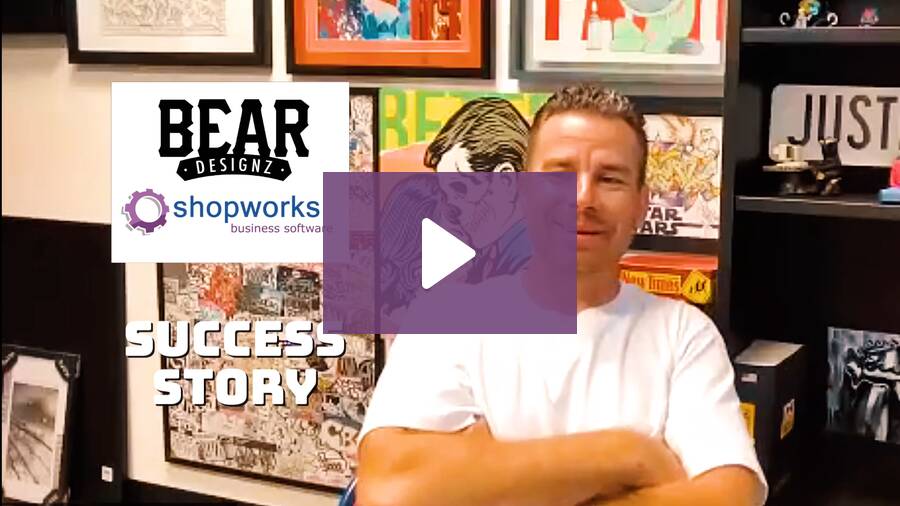
Customer Success Story – Bear Designz

Justin Behringer. I’m the owner of Bear Designz in Southern California. We’re primarily a contract decorator. Prior to getting ShopWorks, I was using dry-erase boards and basically, an eight-hour employee shop manager, production manager just drawing on the board.

Alright. The goods aren’t here for this. How are we gonna move this? I probably had about 220 open orders on an average day.

And within those orders, there’s probably, you know, one to seven events. So it was chaotic. It was it was hectic. And, I couldn’t do it anymore.

No one can do it anymore.

All of our departments were we just had a star. So, like, our receiving was an orange star. If it was good, you just come star the order. If, screens were made, same thing.

We had a purple star. Whatever. I asked around within our industry. Not a lot of people in our community or other shops have any software.

My designer, Tyler, helped me do a lot of research. We interviewed multiple software companies. I just felt ShopWorks was probably the best fit for what I needed to track and manage my production to a level that my customers deserve. You know, like my dry erase board, you have to put the phone down.

Let me go find the person with Shopworks and, like, what we had going on. I’d say that the the calendar, the production, the event management is phenomenal. For me, I’m pretty straight channel. As far as the production, we do utilize every single tab.

Like, we’ve got an accounting, we have sales, so everybody’s use utilizing their departments or windows. I try and just stick to the production and I can breeze through it. I’m I’m in the process of training a new hire right now to schedule and production manage all of the events, and it’s been going great. It’s just it’s pretty straightforward, you know?

We were on the phone with you guys a lot, I I think, in the first couple months, like, learning new things, watching the shop, works, help dot com, just learn a little new thing here and there. And, we kinda grew into our seats. I’d say one, the communication.

We have 12,000 square foot building. We got roughly twenty people here every day. And the communication, I can, my salespeople do not have to get up out of their desk to ask a receiving question. Now if my receiver’s on top of it and it’s in the computer, they’ll know if we’re short one piece, and he’ll come and tell them, hey.

I have a discrepancy, but they can literally look at what they need at any time. They know their order number from us sending an order approval. Just click it in search. Boom.

We can put the order on hold. My team immediately anyone that opens up in any department, it’s on hold. They can’t touch it. So that’s been pretty good.

I can send reports to customers, people that have ten, fifteen, maybe thirty open orders in here. Do a little screenshot, make sure I have everything dialed on my end, and send them a report, and they’ll know every single order where the PO is. Are my goods in in various building? Is my art approved?

So when we set up ShopWorks and we started working it, we just took one order at a time and put it in there. I’d say your guys’ team is great.

OnSite Queues

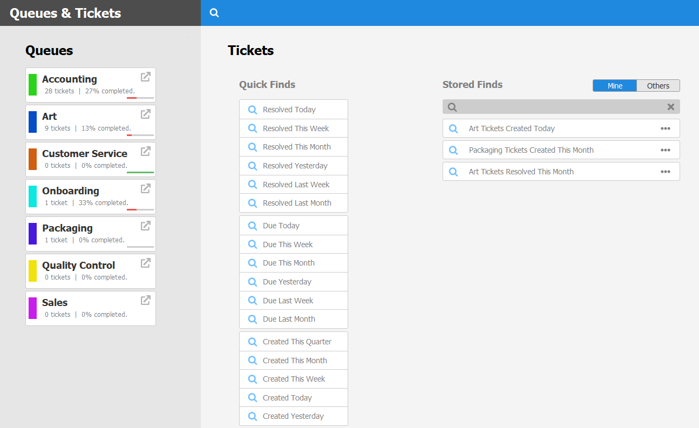
Introducing OnSite Queues: Streamline Your Workflow and Boost Efficiency

Tired of juggling tasks and struggling to keep track of orders? Say hello to OnSite Queues, the latest feature from ShopWorks designed to revolutionize your workflow! This powerful tool allows you to create and manage customized queues for various tasks, such as order processing, design approvals, production, and shipping. With OnSite Queues, you can assign tasks to specific team members, track progress, and ensure that nothing falls through the cracks. This enhanced visibility and organization will empower your team to work more efficiently and deliver exceptional customer service.

Key Benefits of OnSite Queues

OnSite Queues offers a multitude of benefits for decorators of all sizes. First and foremost, it eliminates the chaos of disorganized tasks and streamlines your workflow. By centralizing all tasks in one location, you can easily monitor progress and identify potential bottlenecks. The ability to assign tasks to specific team members promotes accountability and ensures that everyone is on the same page. Additionally, OnSite Queues integrates seamlessly with other ShopWorks modules, such as Orders, Designs, and Customers, providing a comprehensive solution for managing your entire business.

Get Started with OnSite Queues Today!

Ready to experience the power of OnSite Queues? Check out the helpful training video on our website http://www.shopworkshelp.com/index.php?solution_id=1599 to learn how to set up and utilize this game-changing feature. We’re confident that OnSite Queues will transform the way you manage your business and help you achieve new levels of efficiency and success.

Hybrid Printing: The Pinnacle Union of Screen Printing and DTG

The garment decoration industry is unstoppably changing to make the process faster and widen the realm of creativity. Now, it is time for a union of both worlds: hybrid printing; this means screen printing with the most recent method of printing known as direct-to-garment, shortly noted as DTG.

Unlocking Full Potential with Hybrid Printing

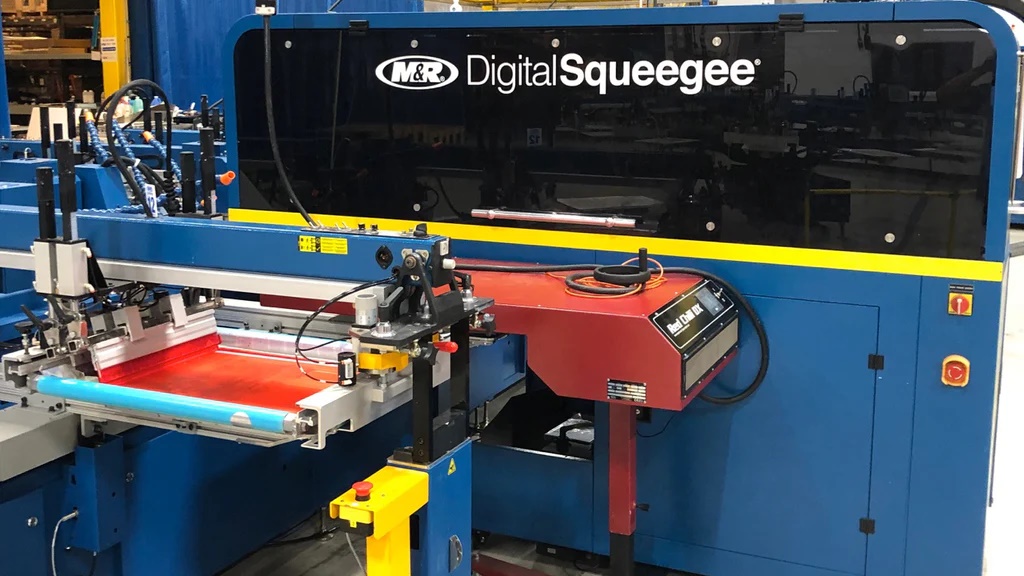
These two can be combined in a way to return the best results for businesses with projects that involve screen printing and DTG printing. Screen printing works best for large production runs, and colors come out bright and long-lasting. In contrast, DTG serves best for short-run and personalized designs with minute details.

Hybrid techniques can come in many forms: base coloration or large areas are printed using screen printing, and then DTG is used to apply the tiny details, logos, or personalized texts. That gives a wider leeway in being flexible, swift, and economical in the lots that are produced.

Rise of DTE: Direct-to-Embroidery

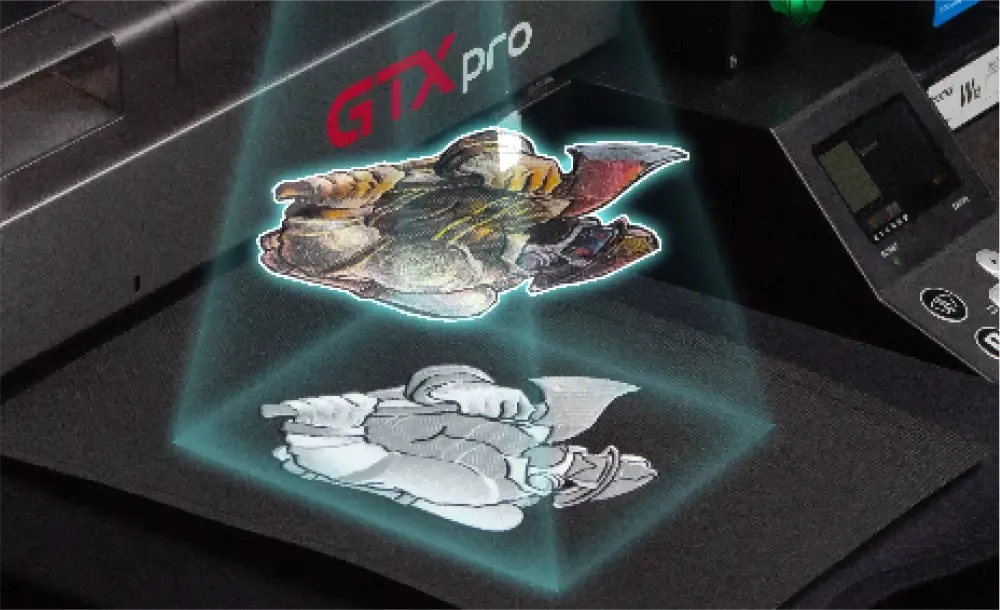
Another intriguing development within the industry of decoration is DTE Technology or Direct-to-Embroidery. The innovative process prints directly onto a single-color embroidered image and adds detailed colors using a DTG process guided by a camera for positioning onto the sewn design without the use of traditional embroidery threads and needles. It has a few advantages, which include faster production, lower labor costs, and intricate designs.

Managing Integration with ShopWorks OnSite

A strong software solution will be needed to effectively oversee hybrid printing processes and technologies coming up, such as DTE. ShopWorks OnSite will simplify operations and Production Workflow. With ShopWorks OnSite, you can:

  • Track your inventory levels of DTG inks, DTF films, and embroidery threads.
  • Production Scheduling: You will be able to handle complex production workflows, including screen printing and DTG production.
  • Automate Order Processing: Streamline order entry, fulfillment, and shipping.

Detailed Reporting: Through the analysis of production data, you will understand trends and further optimize your processes. This allows ShopWorks OnSite to become integrated with accounting, e-commerce, and other software solutions that you may be working with. Hybrid Printing and the use of leading technology like DTE will take your decoration business to new levels. You will handle such processes and deliver fantastic results with just the right software tools at hand, ShopWorks OnSite.

Client Server or Cloud Hosted – What’s Better for Your ERP?

Cloud Vs. Client-Server ERP for Small Businesses

Small business ERP systems are available either as client-server or cloud-hosted systems. Each one has many benefits, and luckily OnSite is is available in both options. Find out if a cloud vs. client-server ERP is better for your small business.

Client-Server Advantages

ERP software solutions for small businesses that you host on a client-server are ideal if your business already has a strong IT infrastructure in place, and the resources to support and administer it.

Having your system and all of your electronic files on-site can be useful because everything is in one place. It’s more secure than an Internet-based solution because it’s harder to steal electronic information stored in a desktop system — the main way to steal offline information would be the difficult process of stealing the physical hardware. In contrast, anything connected to the Internet is at risk from hacking, although with advancing technology and more and more local computer-to-cloud connections, the difference in security between the two is diminishing. Many business owners also just like the fact that their important company information is consolidated and in-house.

Hosting your business software in-house also makes troubleshooting simple (assuming you have a competent IT department), since you can do it yourself instead of waiting for the host to do so at a remote location should problems occur. The costs of keeping your ERP on a server are also lower in the long run since you pay a single upfront cost and then low monthly or yearly costs afterward. Cloud-hosted services typically have higher monthly costs that continue as long as you use the business software.

The other option, a cloud-hosted ERP software for a small business, is equally popular and has many benefits. Here are some of the main benefits associated with cloud-hosted systems:

Cloud Hosted Advantages

Cloud ComputingA cloud-hosted ERP software for a small business is hosted offsite and is accessible from any computer through the Internet. This allows employees to use your system from any connected device, instead of just those computers in your office on which you’ve installed the decorated apparel ERP business software.

These small business ERP systems also take up far less space, since you don’t need an extensive IT infrastructure to host the entire system in-house, and they cost less upfront since there is a monthly fee instead of a large one-time payment and smaller yearly installments. Implementation can also be more streamlined, as the cloud-hosted solution is set up quickly by the pros at the ERP service provider and not a long installation process handled by your own IT department.

Cloud-hosted ERP systems are updated more regularly since they don’t require physical installation onsite. They also lower your payroll costs, since you don’t need such a large in-house IT department to support your entire business infrastructure, not to mention saving you the expensive headaches of maintaining and upgrading your own server and software. Your company information and files are also safe if something happens to your hardware, and even theft of your hardware doesn’t equate to loss of your business information.

As for security, cloud servers are more prone to hacking than desktop systems, but usually have a level of redundancy. Therefore, if someone does hack in, or if the server fails, the cloud system usually has backups and secondary servers ready to kick in to replace it. If you handle your ERP system entirely in-house, however, and the server fails, most companies do not have systems in place to deal with it, since extra servers cost much time and money.

Conclusion

The difference between the cloud vs. client-server ERP for small businesses is like the difference between renting and owning a car. You have all the benefits of transportation when you rent, but you don’t have to take care of maintenance. The trade-off is the higher monthly and overall cost in the long run. The decision between which is best for you depends on the nature of your business.

Whichever type of solution you choose, the best small business ERP systems are those that are comprehensive and can handle all your essential business tasks. Not only that, good ERP systems should include basic tools such as a calendar, backup, and recovery system (by far the most important part of any piece of software), a CRM (Customer Relationship Management) system for leads, and web integration (particularly e-Commerce and email marketing integration). We at Shopworks developed OnSite and the rest of the Shopworks product lineup to handle everything your business needs to work.

For requirements for our client-side system, see our Hardware and Software Requirements page. For details on our cloud-hosted system, see our Documents page. For an overview of OnSite, see our OnSite page.

Cloud ERP: The Top 4 Questions You Should Ask

The Advantages of Cloud ERP Software

More and more small businesses are moving into cloud ERP systems (such as ShopWork’s Cloud Hosted OnSite product). The advantages are many: streamlined implementation, lower cost of ownership, and saving yourself the expensive headaches of maintaining and upgrading your own server and software. It mainly comes down to the question of the ease, security, and accessibility of the cloud versus the risks of cloud-based software.

However, when considering a Cloud ERP system (or any ERP system, for that matter) you’ll want to ask yourself, your team, potential software vendors, and consultants some detailed questions to see if the new system will really meet your needs. We’ve published extensive articles on how to select an ERP System as well as best practices for implementing them. Here, we’ll condense it down to four focused questions for cloud-based ERP software:

1. Are you running the software or is it running you?

Any new software will need some learning and adaptation from both management and production. But be wary of solutions that don’t match your current working business processes – you should dictate how your company runs, not the assumptions of some techie. Find a solution that helps you do what you do well and improve it, not one that will make you turn your business processes inside out to match it. If you can, try to find a vendor that has experience in your industry – and has helped other industry businesses.

2. Have you discussed requirements with your team first, before looking for a solution?

Don’t just sit down in front of a whiteboard with a consultant to brainstorm requirements. All you’ll end up with is a long, expensive, often overkill wish list that might overlook a basic need. Make it a point to sit down with your team to carefully scope precisely what you need your new ERP system to do and what strategic problems it needs to solve. Many software vendors offer helpful needs assessment and solutions plans, but make sure it’s your plan, not the vendor’s.

3. Just how configurable is it?

Nail down exactly how configurable an ERP solution is. Make sure that adapting the solution meets all or 90% of your requirements – an “only 50%-70% can be met” solution is a red flag. Just as important, make sure exactly what “configurable” means. Does it mean you can shuffle around report fields but not adapt the software to your workflow or unique job requirements? Or does it mean a massive commitment to ongoing training and endless implementation cycles? Strike the right balance here because configuring your ERP system to your unique business processes is the most important part of the solution. This is also why question 2 is so important – you need to make sure that it can be configured to fit the goals outlined by your team.

4. Is this made for product decorators?

This relates closely to question No. 1. An ERP system made for just generic business requirements can leave out a lot of needed functionality – resulting in, at best, expensive, ongoing customization and training investments. Better to start with a more complete and industry-specific solution.

Conclusion

A Cloud ERP system can give much to product decorators and decorated apparel sellers, but the questions above will gain those benefits faster, save money, and keep your team from pulling their hair out trying to actually get value out of it. Learn more about the benefits of cloud-hosted software.

Shopworks OnSite was made to fit product decorator business processes, is very flexible, and is made by people with years of experience in the industry. Find out what OnSite can do for you!

What is OnSite?

OnSite is a completely integrated business management tool designed specifically for screen printers, embroiderers, promotional product distributors, award manufacturers and digital printers. We designed OnSite after owning our own shop for 10 years. This knowledge and experience with the industry has gone into all of the ShopWorks products. OnSite software manages every aspect of your business …not just accounting. All the functions and departments of your company are integrated into a single product. OnSite is a multi-user database that runs over your existing network. Because it is a client-server application, it is fast and allows multiple users to use your system simultaneously. All information is real-time…changes made by one employee are immediately seen by others.